
India’s workforce relies on the Employees’ Provident Fund Organisation (EPFO) to secure their financial future. Thanks to digital transformation, what once meant long queues and paperwork can now be managed with just a few clicks — all through the EPFO login system and the Unified Portal.
Whether you’re checking your PF balance, tracking claim status, or updating your KYC details — everything is now accessible online. This guide will walk you through how to use the EPFO member portal, access your EPFO passbook login, and understand the rules behind EPFO claim settlement — without getting lost in technical jargon.
Why is the best EpfoUnifiedPortal.com Portal 2026?
The EPFO Unified Portal is the official digital platform of the Employees’ Provident Fund Organisation (EPFO) in India, providing a comprehensive collection of information. It allows you to access and manage your Provident Fund (PF) and related services online with a single login using your Universal Account Number (UAN). Easy to log in to all Government EPFO portals. Click on the buttons given below.
Need Urgent Money? PF Withdrawal Online — Without Umang App
If you need to access your Provident Fund (PF) savings during an emergency, the process is now simpler than ever. You can instantly withdraw money from your PF account online—directly from your mobile phone—without using the UMANG App.
This step-by-step guide explains how to withdraw your PF online through the official EPFO member portal (Unified Portal), check PF balance, update your KYC details, and track claim status — all in one place. Designed for employees and professionals across India, this article breaks down the entire PF withdrawal process clearly, securely, and in easy-to-follow steps.
Step-by-Step Guide: How to Withdraw PF Online from Mobile
No need for the Umang App anymore. You can now access your PF withdrawal process directly from your mobile browser.
Here’s how it works
Step 1: Open the EPFO Website
Go to your mobile browser (like Google Chrome), search “EPFO”, and open the official website www.epfindia.gov.in.
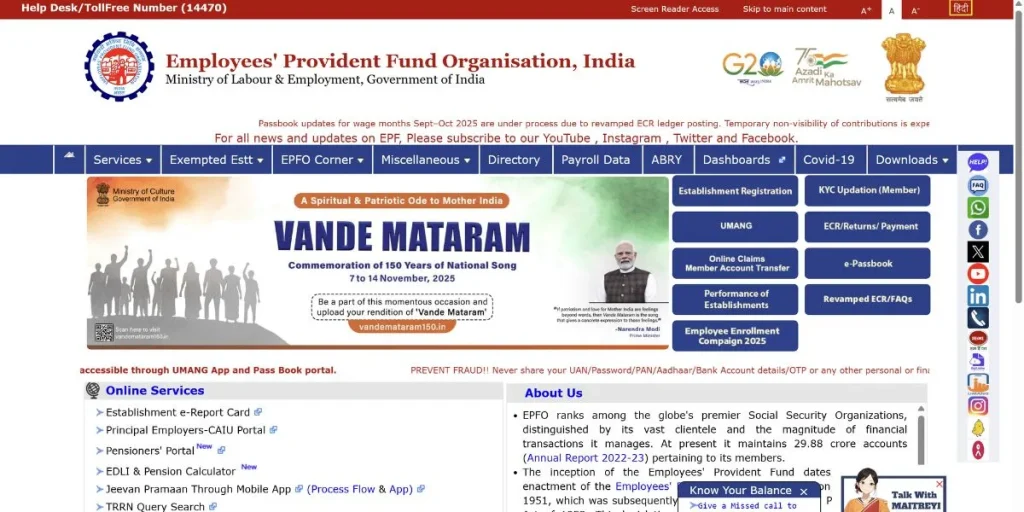
Step 2: Login to the Unified Member Portal
- On the homepage, tap on “Online Claim Member Account Transfer”.
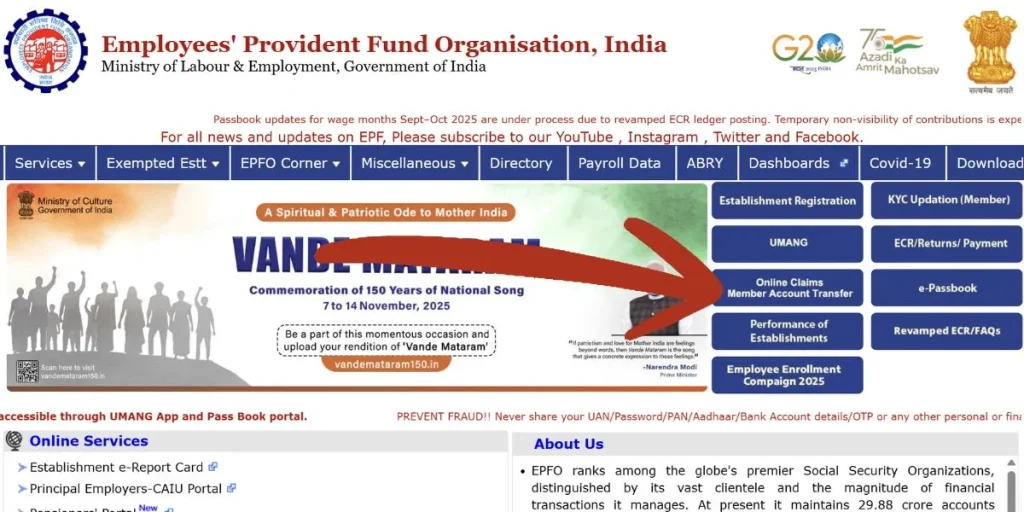
- Switch your browser to Desktop Mode.
- Then log in using your UAN, Password, and OTP to access your PF account.
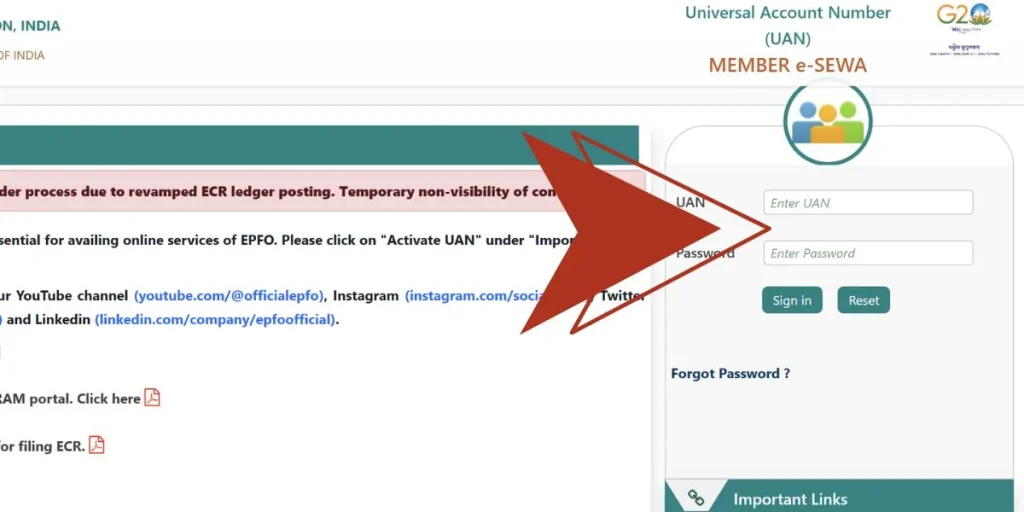
Check PF Balance and KYC Status Before You Withdraw
Before applying for withdrawal, make sure you check your PF balance and verify your KYC details.
- To Check PF Balance:
Go to Menu → View → Passbook (Lite).
You can see your last 5 contributions and detailed balance here.
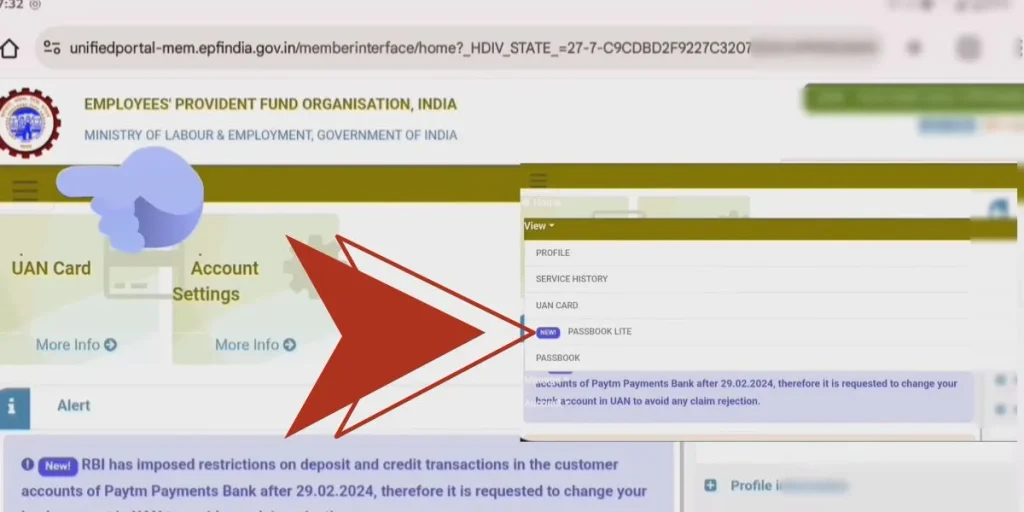
- To Verify KYC: Go to Manage → KYC.
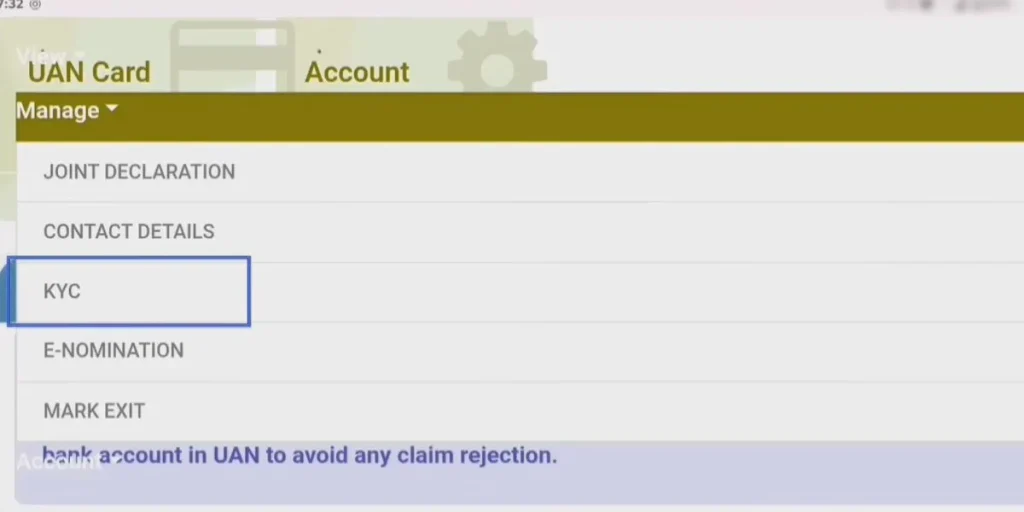
- Ensure your Bank, PAN, and Aadhaar are updated. If not, you can update them online instantly.
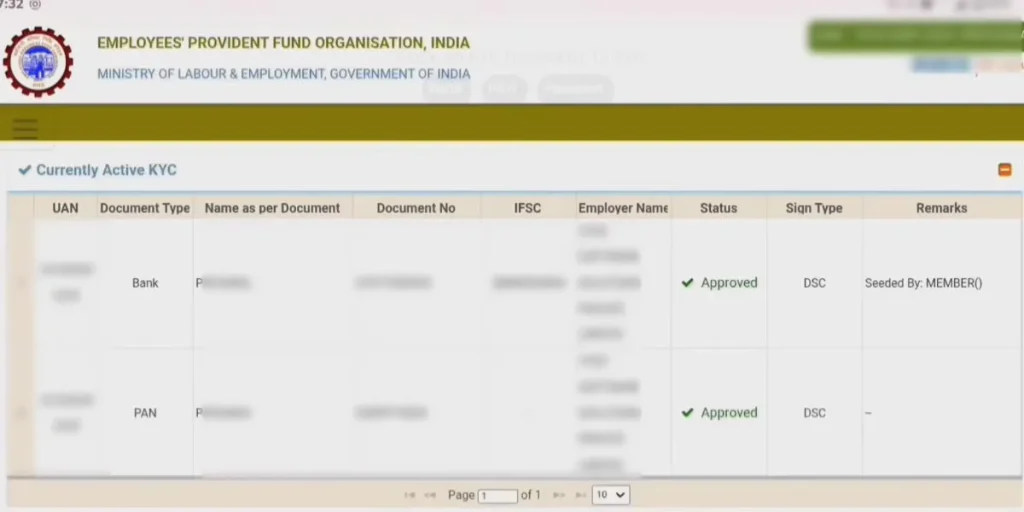
Apply for PF Withdrawal (Online Claim Process)
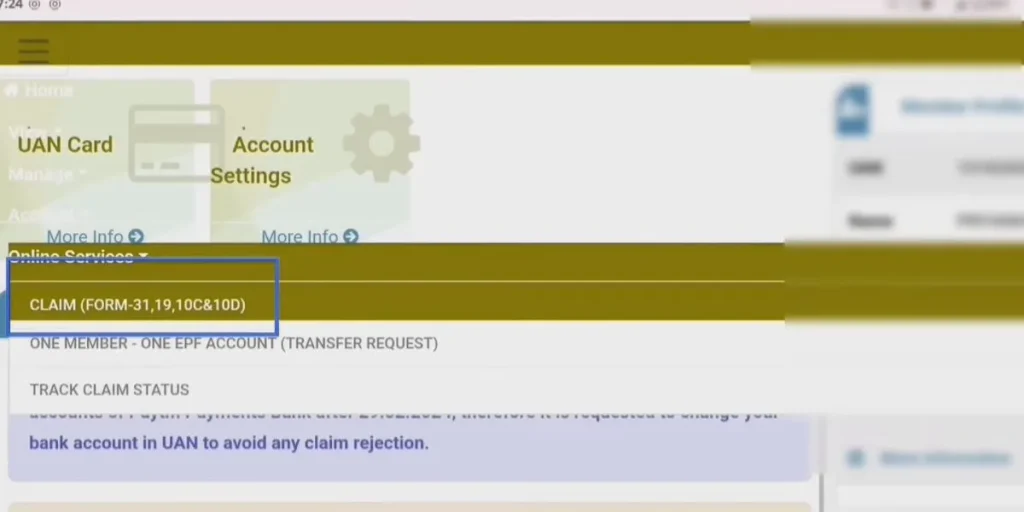
Step 3: Choose the Claim Option
Open Menu → Online Services → Claim (Form-31, 19, 10C).
Step 4: Verify Your Bank Account
Enter your bank account number (linked to KYC) and click Verify.
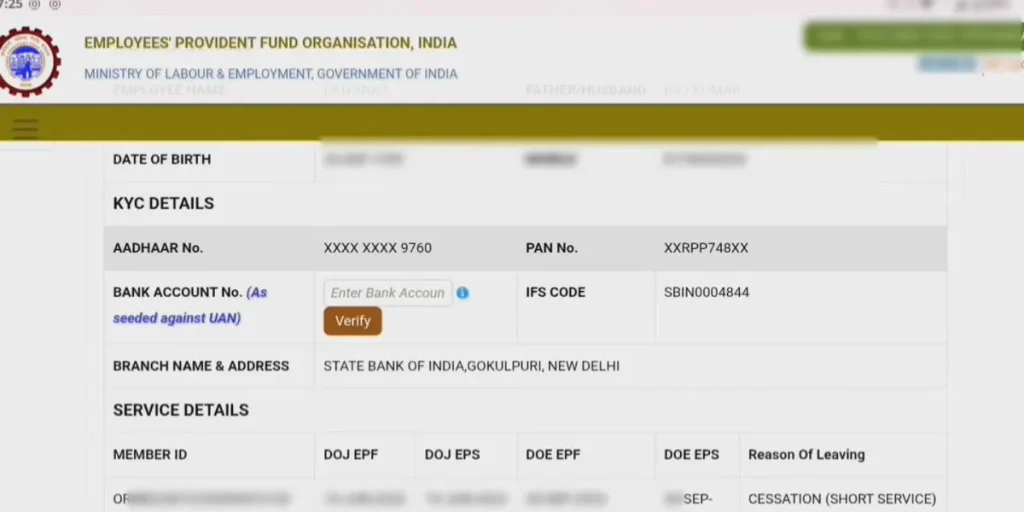
Step 5: Select the Appropriate Form
You can apply using any of the following forms, depending on your needs:
- Form 31: Advance PF withdrawal (for emergency)
- Form 19: Final PF settlement (after leaving job)
- Form 10C: Pension withdrawal
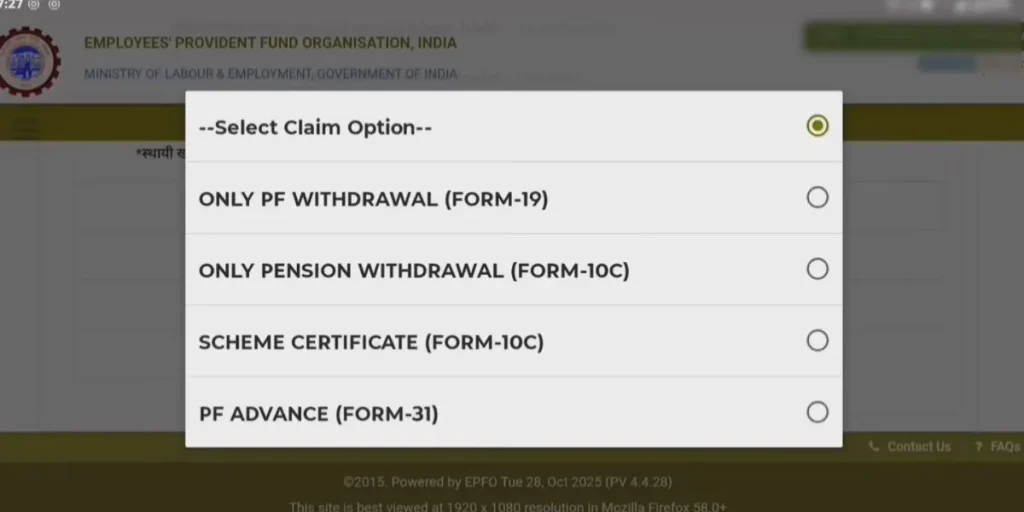
Step 6: Fill Details and Confirm via OTP
Enter your withdrawal amount, address, and purpose, then click Get Mobile OTP.
Enter the OTP and hit Submit Online Claim.
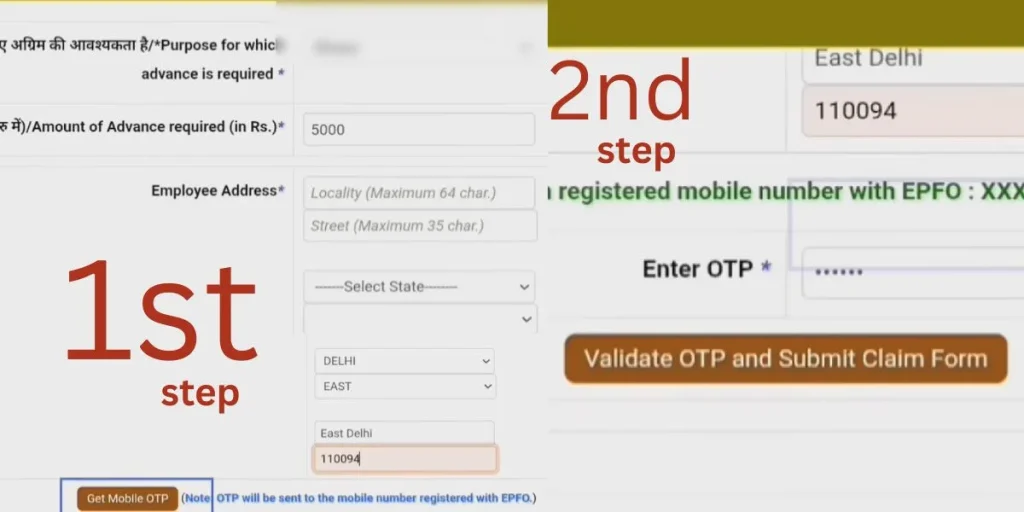
Claim Settlement and Money Transfer
Once your claim is submitted, EPFO processes it within a few working days. Your PF amount gets directly transferred to your bank account (as per your KYC details). You can also track your claim status online after submission.
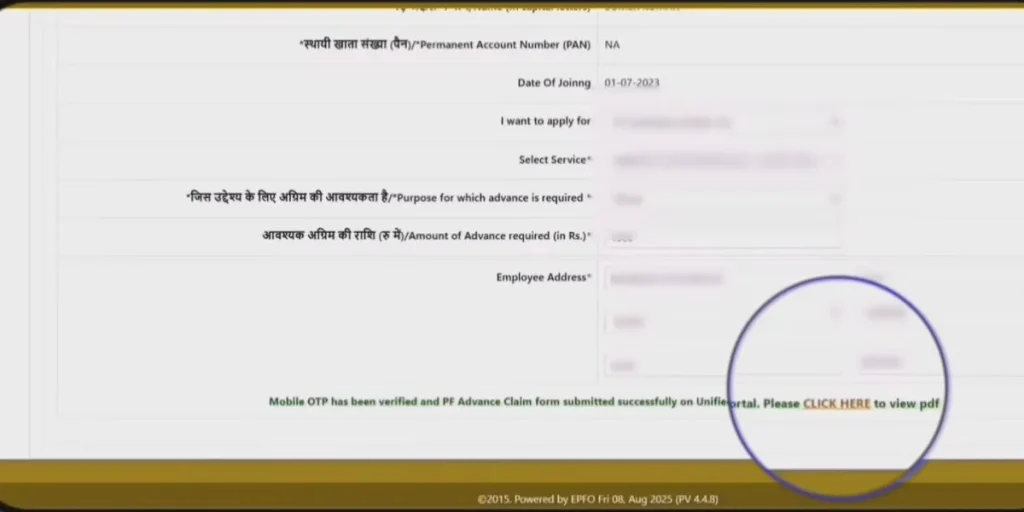
Important Tips for Smooth PF Withdrawal
- Always verify your KYC and bank details before applying.
- Keep your registered mobile number active for OTP verification.
- Correct any name or detail mismatches to avoid delays.
- Use only the official EPFO portal, not third-party websites.
Withdraw PF Online Easily from Your Mobile
You don’t need the Umang App or any cyber café anymore. With just your mobile and internet, you can withdraw PF easily, safely, and officially—completely online. Stay smart, stay updated — and make the most of your money.
What Is EPFO Login?
The EPFO login is your digital gateway to managing your Provident Fund account.
Once logged in via the Unified Portal, you can:
- View your current PF balance
- Download your EPFO member passbook
- Track pending claims
- Update personal details like Aadhaar, PAN, or bank info
- Submit nominations or transfer requests
It’s designed for simplicity — no office visits, no delays. Just one secure login to manage your retirement savings.
| 💡 Pro Tip: Always use the official site — https://unifiedportal-mem.epfindia.gov.in — to avoid phishing scams. |
IMPORTANT SECURITY ADVISORY
Members are strictly advised to follow the guidelines below to protect their personal and financial information.
1. Visit Only Official EPFO Websites
Always access EPFO services through the official URLs only:
2. Carefully Verify URLs Before Logging In
Check the spelling, domain name, and any unusual variations in the URL.
Fake websites often imitate official portals to steal information.
3. Never Click on Unverified Web Links
Avoid opening links received through SMS, email, or social media unless you are certain they are legitimate.
4. Do Not Share Sensitive Information on Unauthorized Websites
Do not provide personal details such as:
UAN, PPO, password, Aadhaar, PAN, bank details, or OTP on any website other than the official EPFO portals.
5. Report Suspicious Activity Immediately
If you come across any suspicious website, message, or phishing attempt, report it to the official EPFO helpdesk or cybersecurity reporting channels.
6. EPFO Never Asks for Personal or Login Details
EPFO does not ask for your personal information, OTPs, or login credentials through phone calls, WhatsApp, SMS, social media, or email.
Any such request should be treated as fraudulent.
Understanding UAN: Your Permanent PF Identity
Before you can log in, you need a Universal Account Number (UAN) — a 12-digit ID that stays with you across jobs. Think of it as your lifelong PF identity card.
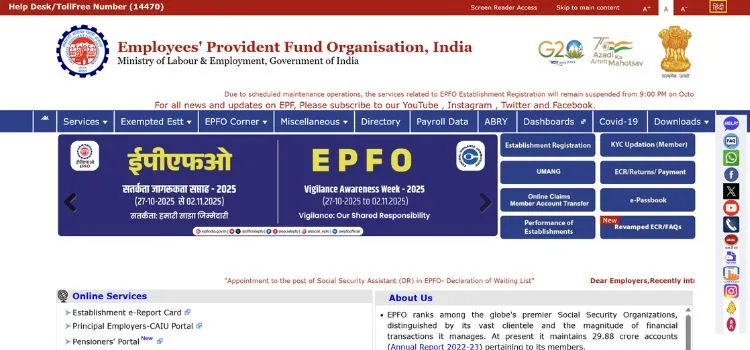
How to Activate UAN for EPFO Login
- Visit the EPFO Unified Portal.
- Click “Activate UAN” under Important Links.
- Enter your UAN, Aadhaar, name, DOB, and mobile number.
- Verify the OTP sent to your registered phone.
- Set a password—and you’re ready to go!
Once activated, your UAN becomes the key to accessing all services—from EPFO employee login to filing claims or downloading your passbook.
Step-by-Step EPFO Login Guide
Follow these steps to log in smoothly:
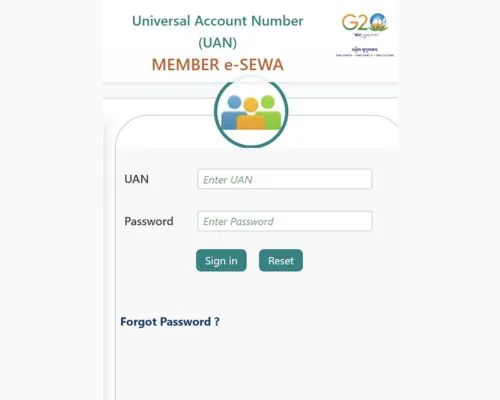
- Go to → unifiedportal-mem.epfindia.gov.in
- Enter your UAN, password, and captcha.
- Click “Sign In.”
After Login, You Can:
- Check your EPFO member passbook
- File or track claims
- Update KYC documents
- Download your UAN card
- Submit e-nomination
No more waiting for employer approvals—you’re in control.
Accessing Your EPFO Member Passbook
The EPFO passbook login gives you a detailed view of every contribution made to your PF account.
How to View or Download Your Passbook
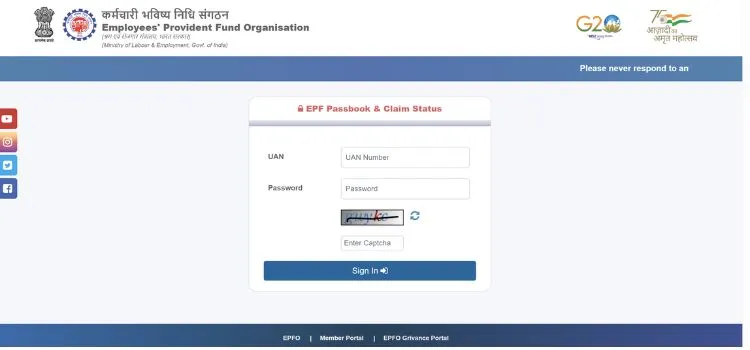
- Visit → https://passbook.epfindia.gov.in/MemberPassBook/Login.jsp
- Log in using your UAN and password.
- Select the relevant Member ID (linked to your current employer).
- View or download your statement in PDF format.
What You’ll See in Your Passbook
| Column | Description |
|---|---|
| Particulars | Type of transaction (Contribution, Interest, Withdrawal) |
| Employee Share | 12% of basic + DA contributed by you |
| Employer Share | Split between EPF and EPS |
| Interest | Annual interest credited |
This transparency ensures your monthly contributions are accurately recorded—no guesswork needed.
Navigating the EPFO Member Portal
After logging in, you’ll land on your EPFO member portal dashboard—where you can manage everything related to your PF account.
Key Sections
View
KYC verification status
Personal profile & service history
UAN card download
Manage
File e-nomination
Edit personal details
Link Aadhaar, PAN, Bank Account
Online Services
Merge multiple PF accounts under One Member – One EPF
Submit withdrawal or transfer claims
Track EPFO claim status
Everything is centralized—making life easier whether you’re changing jobs or planning early withdrawals.
Tracking Your EPFO Claim Status
Once you submit a claim, you can monitor its progress directly through your EPFO login.
Steps to Check Claim Status
- Log in to your account.
- Go to Online Services → Track Claim Status.
- View your claim ID, type, date, and current stage.
Common Claim Stages
| Status | Meaning |
|---|---|
| Submitted at Portal | Successfully filed |
| Sent to Field Office | Under review by EPFO office |
| Under Process | Being verified |
| Settled | Approved & payment released |
| Rejected | Denied due to mismatch or incomplete docs |
Knowing these stages helps reduce anxiety—because you’re always in the loop.
EPFO Claim Settlement Rules Made Simple
Not sure when or how much you can withdraw? Here’s a quick overview of common scenarios:
1. Final Settlement (Forms 19 & 10C)
- Apply if you’ve left employment and been unemployed for 2 months.
- Withdraw the full PF balance + pension contributions.
- If you’ve served 10+ years, you’re eligible for a pension after turning 58.
2. Partial Withdrawals (Form 31)
| Purpose | Eligibility | Max Withdrawal Limit |
|---|---|---|
| Home Purchase | 5+ years of service | 36× basic + DA |
| Loan Repayment | 10+ years | 36× basic + DA |
| Marriage | 7+ years | 50% of employee share |
| Education | 7+ years | 50% of employee share |
| Medical Treatment | No limit | 6× basic + DA |
| Pre-Retirement | Age 57+ | 90% of balance |
You can apply for any of these directly through your EPFO login—no forms, no stamps.
Recent Improvements in EPFO Claim Processing
Thanks to technology upgrades, claim settlements are faster and smoother than ever:
- Auto-Settlement System: Eligible claims are processed automatically within hours.
- e-KYC Verification: Aadhaar-linked data eliminates manual checks.
- Multi-Location Settlement: Any regional office can process your claim.
- Reduced Processing Time: Most claims are settled in 3–5 working days.
- UMANG App Integration: Access your EPFO portal anytime via smartphone.
These changes reflect EPFO’s commitment to building a truly paperless, user-friendly experience. As users become more comfortable with fast and fully digital platforms, many also explore technology-driven entertainment platforms such as BDG Win Game, where users engage through interactive gameplay features.
For Employers: EPFO Unified Portal Employer Login
Organizations also benefit from the EPFO unified portal employer login, which allows them to:
- Register new employees and assign UANs
- Upload ECR (Electronic Challan-cum-Return) files
- Approve withdrawal/transfer claims
- Verify employee KYC details
- Download payment challans and receipts
How to Log In as an Employer
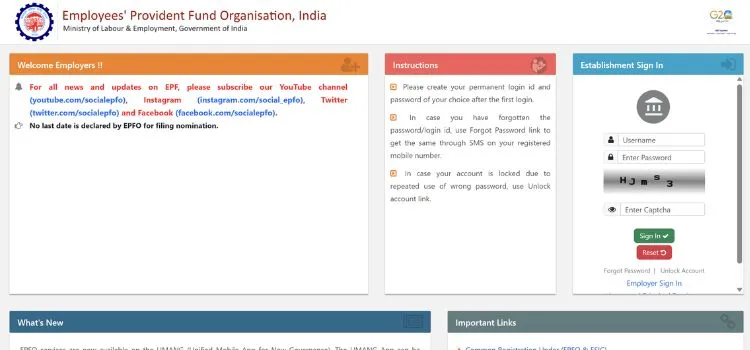
- Visit → https://unifiedportal-emp.epfindia.gov.in
- Enter establishment ID, password, and captcha.
- Click “Sign In” to access your employer dashboard.
This ensures timely, accurate, and compliant PF management—helping businesses stay audit-ready.
Why Use the EPFO Unified Portal?
| Feature | Benefit |
|---|---|
| Single EPFO login | One secure entry point for all services |
| Centralized dashboard | Real-time view of PF, pension, claims |
| Online KYC updates | Faster processing + enhanced security |
| Paperless claims | Save time, reduce errors |
| 24×7 availability | Access anytime, anywhere |
Whether you’re an employee or employer, the Unified Portal EPFO simplifies financial management like never before.
Need Help? Contact EPFO Support
If you face issues with EPFO login, UAN activation, or tracking your claim status, reach out through these channels:
| 📞 Toll-Free Helpline: 1800 118 005 📧 Email: employeefeedback@epfindia.gov.in 🌐 Official Website: https://www.epfindia.gov.in ⚖️ Grievance Portal: https://epfigms.gov.in Facebook: https://www.facebook.com/socialepfo Instagram: https://www.instagram.com/social_epfo/ |
Frequently Asked Questions (FAQs)
How Can I Log In To The EPFO Member Portal Using My UAN?
You can access the EPFO member login by visiting https://unifiedportal-mem.epfindia.gov.in. Enter your UAN (Universal Account Number), password, and captcha to log in. Once logged in, you can check your balance, update KYC, or download your EPF passbook.
How Do I Log In To The EPFO Employer Portal?
Employers can log in via the EPFO employer login portal at https://unifiedportal-emp.epfindia.gov.in. Use your establishment ID, password, and captcha to sign in. The dashboard lets you upload ECR files, approve claims, and manage employee PF details.
How Can I Check My EPFO Passbook Online?
To access your EPFO passbook, go to https://passbook.epfindia.gov.in/MemberPassBook/Login.jsp. Log in using your UAN and password, then choose your Member ID. You can view or download your EPF passbook in PDF format—showing monthly contributions and interest.
Can I Log In to EPFO Using the Umang App?
Yes, you can log in to EPFO via the UMANG app (Unified Mobile Application for New-age Governance). Use your UAN and OTP to sign in and access services like checking balance, viewing passbook, and tracking claims—all from your mobile phone.
What Should I Do If I Forget My EPFO Login Password?
If you’ve forgotten your EPFO login password, visit the login page and click ‘Forgot Password.’ Enter your UAN, verify your registered mobile number via OTP, and then set a new password to regain access.
Can I withdraw 100% PF amount online?
Yes. You can withdraw 100% PF online after leaving your job and being unemployed for 2 months, by filing Form 19 and Form 10C on the EPFO portal.
Can I withdraw PF after becoming an NRI or moving abroad?
Yes. NRIs can withdraw PF online through the EPFO portal, provided KYC (Aadhaar, PAN, bank) is updated and employment under EPFO has ended.
What are the new rules for PF withdrawal?
The new PF withdrawal rules make it easier to access money: 100% withdrawal is allowed after leaving the job, partial withdrawals need 12 months of service, limits for education/marriage and housing are increased, and pension withdrawal now requires 36 months. Overall, the process is simpler and faster.